Photos & portraits
ID photo background: white, blue or red, at the size you need
For a job application, a membership card, a school form or a visa portal. The person is cut out of the photo exactly as photographed — nothing about the face, hair or clothes is generated or “improved” — and placed on a plain background in the colour and size you pick, all made in your browser. Check your authority’s rules for head size, expression and glasses before you submit.
What you get
- Cut-out (transparent PNG)
2 credits per run


Free to try — sign in when you generate.
How it works
- 1Upload a head-and-shoulders photo
- 2The background is cut away
- 3Download the size and colour you need
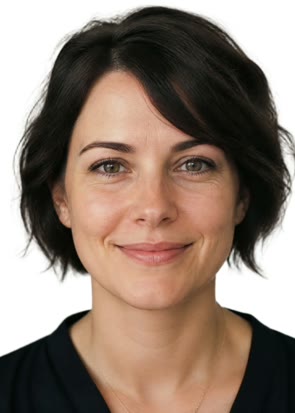
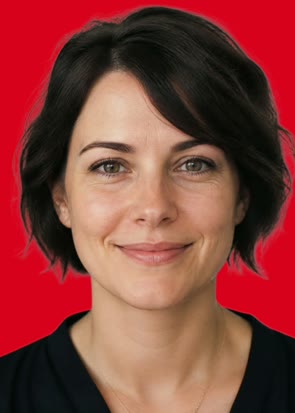
A real run
Made with this page and not retouched — what went in comes first.

FAQ
Will it be accepted for a passport or visa?
That depends on your photo meeting the authority’s rules — head size, neutral expression, no shadows, no glasses glare — which this page does not check. It gives you the right pixel size and a clean background; frame yourself properly when you take the photo.
Does it change my face or clothes?
No. Nothing is generated; the only step is cutting the background away. What you upload is what you get, on a new background.
Which sizes are these?
1 inch = 25 × 35 mm, 2 inch = 35 × 49 mm (China and much of Asia), 35 × 45 mm (EU, UK, many others), 2 × 2 inch (US). All at 300 dpi. For another size, download the cut-out and place it yourself.
Is my photo kept?
The cut-out is saved to your library, which only you can see; the sizes and backgrounds are made in your browser and never uploaded.
Is it free to try?
Yes — new accounts get free credits. Generating signs you in; paid plans add more monthly credits.